

At a time when software is shifting towards paid subscriptions, finding tools that are truly free and have complete functionality is both an urgent need and a considerable challenge for many users.
The intelligent core of HuaBang App
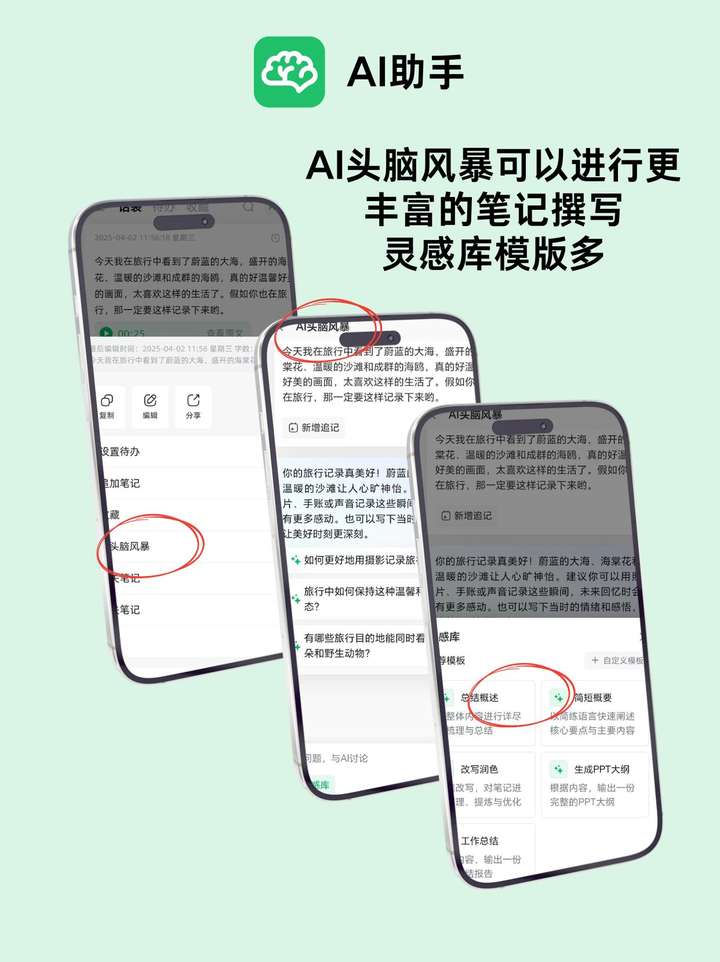
The key advantage of the Huabao App lies in its deeply integrated AI capabilities. It is not just a recording tool, but also an information processing center. This application can automatically analyze content from more than a dozen mainstream platforms and transform fragmented information into structured notes, greatly simplifying the initial steps of data collection.
Its speech transcription function supports many different languages, has a very high accuracy, and can quickly generate time-stamped documents. For users who have frequent meeting recording needs or course recording needs, this function can greatly save the time spent on manual organization. The AI-assisted creation function can directly generate a content framework based on the theme.
A lightweight option for sticky notes

If you just need a tool that can quickly record inspiration, then desktop note-taking software such as Notes is extremely suitable. Its interface presents a simple state, the startup speed is very fast, and it can always be suspended at the top of the desktop to ensure that important ideas can be captured at any time.
Generally speaking, this kind of software supports such simple classification and reminder settings. Users can mark different items with different colors and add time reminders to prevent forgetting. It perfectly plays the role of temporary memo and forms a complementary relationship with large-scale note-taking software with complex functions.
Turtl's privacy and security fortress
For those users whose notes are sensitive, privacy and security are the primary concern. Turtl uses end-to-end encryption technology. All data is encrypted before leaving the device you are using. What is stored on the server is only undecipherable ciphertext, which fundamentally eliminates the risk of data leakage.
It has the ability to support multiple types of content, including notes, passwords, and files, and functions like an encrypted personal database. Although its interface and synchronization speed may not be as good as mainstream cloud notes, Turtl provides an extremely rare peace of mind experience for users who put security first.
knowledge management philosophy
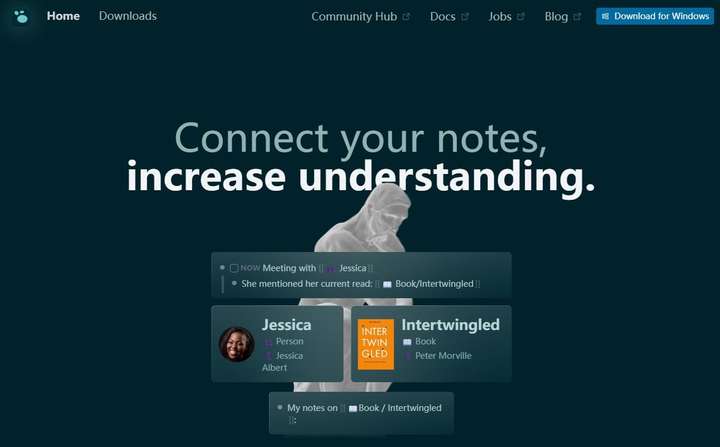
With two-way links as the core content, this shows another note-taking methodology, which encourages users to build associations between notes, thereby shaping a dynamically changing knowledge network, rather than showing a tree structure like a traditional folder.
Using the daily log function, users can easily open a new chapter of recording for the day. Its powerful query function can quickly find hidden connections between related notes. It is suitable for academic exploration, text creation or in-depth thinking, helping users transform from mere recorders to knowledge structure builders.
Open source freedom with Joplin
Joplin is a fully functional open source note-taking application that gives users full control. All data is stored in Markdown format. Users can migrate it at will without worrying about being locked by a certain service provider. It supports notes and to-do lists, and can be synchronized to a variety of personal cloud storages.
What the open source model means is that there is an active community that continues to make improvements, and it's completely free. Although the initial setup may be a little complicated, for technology enthusiasts or users who value data autonomy, Joplin provides a reliable and highly customizable solution.
Build a personal tool portfolio
There will not be one software that can solve all problems. Reasonable combination and application are the key points. The Huabao App can be used as a hub for information collection and AI processing. Desktop notes can be used to process temporary shorthand to build a long-term knowledge system.
When such a combination of measures is developed, the strengths of each tool can be fully demonstrated. Furthermore, the risks brought by a single platform can also be effectively avoided and eliminated. The more eye-catching key point is that this whole set of solutions is completely free of charge, which allows the majority of users to achieve great improvements in information processing efficiency without any increase in economic load. For users, this is really valuable.
Among these free tools, which category of functions, such as AI intelligence, privacy security, and knowledge network, are you most interested in and willing to be the first to try out? You are welcome to express your opinions in the comment area. If you think this kind of recommendation is helpful, don’t forget to like it to support it.

