You have old photos and negatives that need to be digitized at home, and using the right tools can make your old scanner look professional.
Core functionality overview

This software can be directly connected to the mainstream scanner brands on the market, eliminating the trouble of finding dedicated drivers. Users can adjust key scanning parameters such as resolution and color mode directly on the software interface to cater to different needs from documents to photos.
The software has an internally configured automatic cropping function that can intelligently identify image edges without the need for manual frame selection. For those users who need to batch process a large number of old photos, such a function can significantly reduce the time required to perform repeated operations.
Improve image quality
The software is specially optimized for photo scanning. Its color balance algorithm can automatically correct color casts caused by age. Even faded old photos can restore relatively vivid colors after scanning and processing.
When processing slides and color negative films, the software provides an independent color mode, which supports more than 200 film types. With the help of complex algorithm conversion, the original image information on the film can be accurately restored.
Efficient workflow
The workspace design of the software presents a clear state, with the "Preview" panel being the core area. Before performing a full-resolution scan, users can view low-resolution snapshots here and adjust the composition and parameters in advance to avoid repeated scanning.
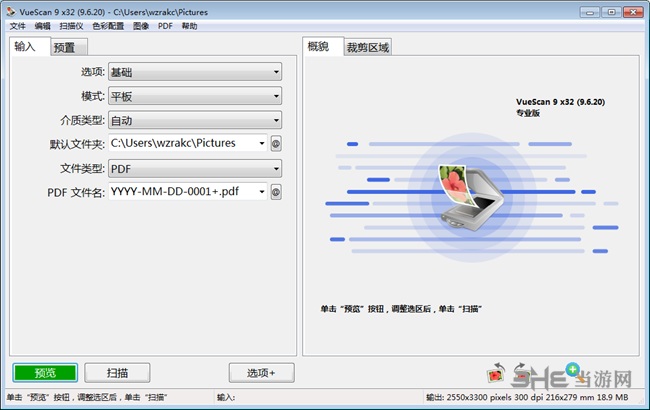
On the left panel, basic operation controls such as scanning, previewing, etc. are concentrated. However, more advanced functions are integrated in the top menu bar. Most of the daily operations can be completed by just clicking the "Scan" button, and the process is simple and intuitive.
From preparation to output
Before starting to scan, the scanning media must be placed correctly. Ordinary photos should be placed face-down. Slides or negatives need to be placed in the appropriate film holder, and the corresponding media type must be selected in the software.
When the settings are complete, click the button called "Preview" to generate a quick preview. This kind of preview can help users confirm the location of the image and the general effect, and the software will automatically define the scanning area based on the preview to avoid scanning useless blank parts.
Batch and format support
Users can use the software's batch scanning function to continuously scan multiple photos or documents, and the system will automatically name the files and save them to a designated folder. In this way, the efficiency has been greatly improved when processing a large amount of backlogged data.
In addition to the common image formats, the software also has the ability to support the generation of multi-page PDF documents. Set the file type to PDF in the "Input" tab, so that multiple pages can be scanned and merged into one PDF file. This situation is suitable for document archiving.
Continuous updates and compatibility
The development team continuously updates the software to add support for new scanner models, including multiple document scanner series from Fujitsu, multiple document scanner series from Canon, and multiple document scanner series from Epson. This ensures that the software can keep up with the pace of hardware development.
That software is also very particular and pays attention to the details of the experience. For example, it can support adding white borders around scanned images. In addition, it also allows administrators to lock the default settings with the help of configuration files. It is because of these related functions that it can be applied to environments such as offices where many people use it together.
Do you also have an album full of old photos that need to be digitized? Do you care more about the efficiency of the scanning software, or do you value the final image quality restoration effect more? Please share your views in the comment area. If you find this article helpful, please give it a like and support it.