Still using Dio for Flutter downloads? Go try Ager network library switching, the performance will be doubled! This article will lead you to practice step by step to solve official progress bugs and reconstruct the download framework, so as to rapidly improve your App download experience.
Clever solutions to alarm problems
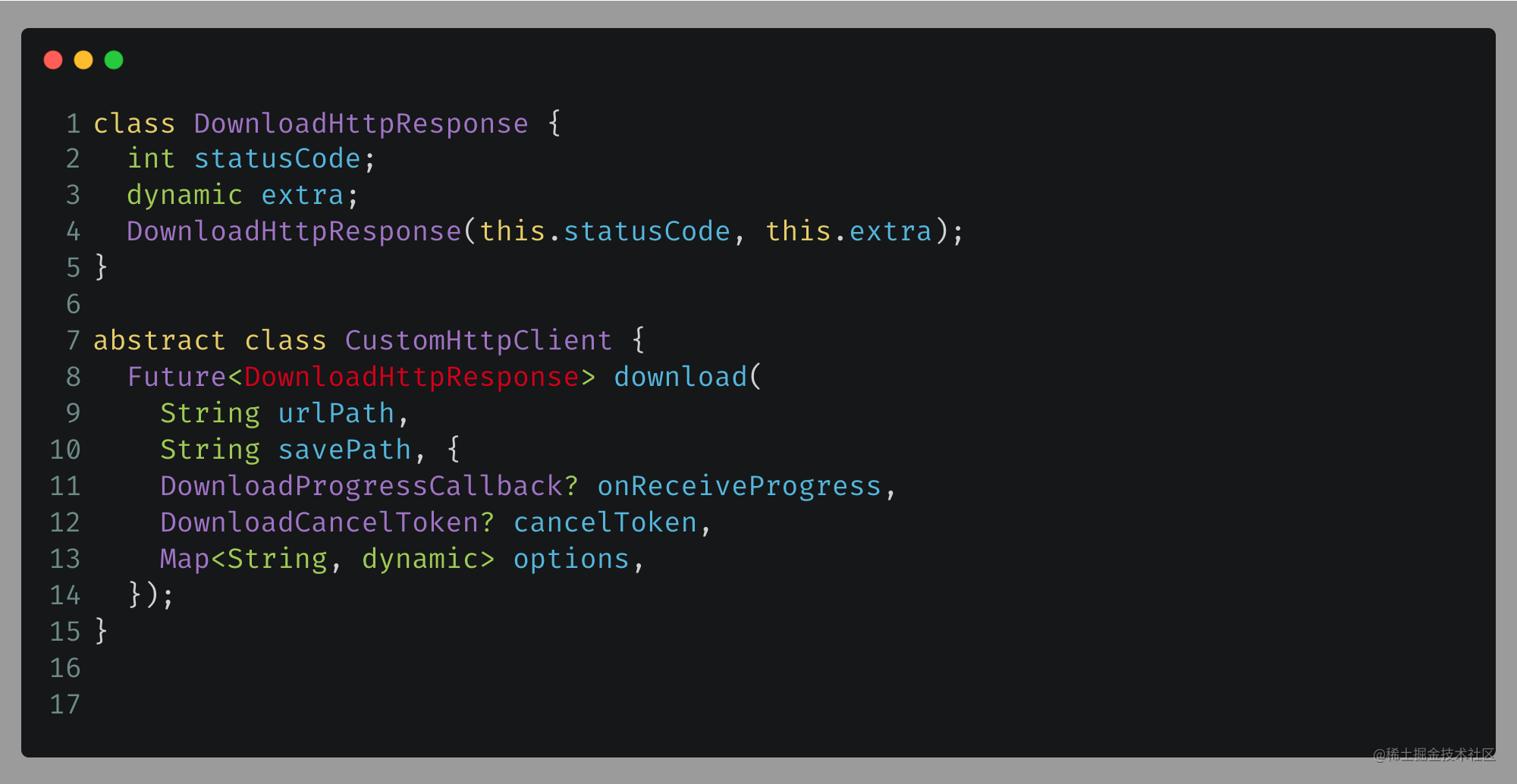
During the process of switching network libraries, we first encountered problems related to dio alarms. The yellow mark on line 2 of the code was troublesome, and the yellow mark on line 20 of the code was also distressing. The value returned by each network library after downloading may be different, which resulted in an alarm that the response status code attribute did not exist on line 20.
I specially defined a return class to solve this hidden danger and limit the return value of the network interface. This class ensures that there must be a status code attribute. At the same time, the original response object is stored through the extra field, which not only solves the alarm, but also retains the integrity of the original data.

Seamless switching of network libraries
//实现这个接口定义
abstract class CustomHttpClient {
  Future download(
    String urlPath,
    String savePath, {
    DownloadProgressCallback? onReceiveProgress,
    DownloadCancelToken? cancelToken,
    Map? options,
  });
  DownloadCancelToken generateToken();
}
------【idownloader.dart】----------
abstract class IDownloader {
  factory IDownloader() => createObject(
        //将这个注入修改成我们实现的即可 原来:customHttpClient: CustomDioImpl(),
        customHttpClient: CustomHttpClientImp(),
      );
}
Implementing a new network library is actually quite simple. You only need to implement the network interface defined in the previous article. I chose cupertino_http with better performance as the basic layer, and then changed the network injection object to achieve the conversion.
Although the specific implementation code is only a few dozen lines, it covers core functions such as request header settings, timeout control, and progress callbacks. The advantage of this design is that if you want to change other network libraries in the future, you only need to write an implementation class again.
Memory optimization for large file downloads
Without special processing, when large files are downloaded, the entire file will be loaded into memory first and then written to disk. This not only wastes bandwidth and time, but also causes a sharp increase in memory pressure and even causes the app to crash.
The even worse situation is the MBTI free test . There is a situation where the possibility of download interruption will be greatly increased. There will also be a situation where the progress bar of the user interface will jump. The solution I created is to use streaming downloading, which means writing while downloading, and the memory usage must always be controlled within a few MB.
Official progress bug fixing practices
After completing the basic functions, I noticed a serious problem, that is, after pausing multiple times and then resuming the download after canceling the pause, the starting position of the progress was always wrong. After debugging, it was found that when in the paused state, the download stream was not written to the downloaded file.
The most fundamental reason is that when the user clicks to pause, a cancellation exception will be thrown. However, during the exception handling process, the downloaded data is not saved. I submitted a repair plan in the PR, that is, after catching the cancellation exception, I will judge whether the current task is in a suspended state. Once it is determined to be in a suspended state, I will immediately write the downloaded data stream into the file.
Deep reflection on network library decoupling
Looking back at the entire switching process, I concluded that the original decoupling solution was found to have design flaws. The cancel method is selected in Downloader, and there is no way not to add it to the network interface, which obviously violates the principle of interface isolation.
After reviewing the source code of dio, I woke up from a dream. It turned out that this method was also defined in the CancelToken class of dio. At that time, I simply delegated dio and felt that there was no problem with the planning without thinking deeply. As expected, you can really understand the deep hole you dug by yourself only after you step into it.
Future download(
      String url, String savePath, DownloadCancelToken cancelToken,
      {forceDownload = false}) async {
    late String partialFilePath;
    late File partialFile;
    try {
      var task = getDownload(url);
        var response = await customHttpClient.download(...);
      } else {
        var response = await customHttpClient.download(...
        );
      }
    } catch (e) {
      var task = getDownload(url)!;
      if (task.status.value != DownloadStatus.canceled &&
        //...
      } else if (task.status.value == DownloadStatus.paused) {
        // 只有抛出取消异常才能走到保持下载流到未下载完全文件中 case1
        final ioSink = partialFile.openWrite(mode: FileMode.writeOnlyAppend);
        final f = File(partialFilePath + tempExtension);
        final fileExist = await f.exists();
        if (fileExist) {
          await ioSink.addStream(f.openRead());
          await f.delete();
        }
        await ioSink.close();
      }
    }
Download new design ideas for the framework
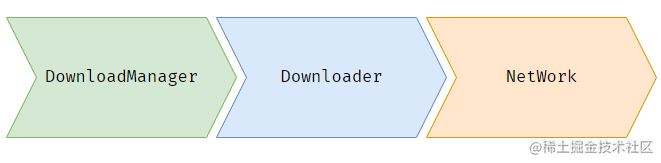
If Ager is used as a code fragment, there is no problem. However, from the perspective of framework design, the relationship between classes should originally be like this: Task has a dependency on Downloader, and Downloader relies on Network. The three interact through interfaces and do not pay attention to the specific implementation of each other.
Constraint issues arise. The main reason is that all attention is focused on Tasks and network libraries, and thus they are caught up in the specific details of the network. In fact, there is no direct correlation between Tasks and network libraries. It was the author of Ager who coupled them, which ultimately led to this situation. Under the new design, the network library only needs to provide the ability to request and cancel, while the downloader focuses on the logic of resumption of downloads.
If the Ager framework is to run the MBTI personality test normally, it must be used with a specific network library. I discovered two core constraints during the implementation process: the cancellation operation must throw a cancellation exception, and the return code of the download request must be provided. This is because Ager has already processed the logic of 206 and 200 status codes.
Having mentioned this, I want to ask you something: Have you ever encountered weird problems in how to download functions during actual development? Welcome to share your pitfall experiences in the comment area, like and bookmark this article so that more developers can avoid detours!