
When mobile phone storage is in a state of emergency, many people's initial reaction is to delete photos. However, the end result is often extremely insignificant and precious time is wasted. In fact, there are several hidden "space occupiers" in the system, and only by cleaning them up can massive amounts of space be effectively released.

Invisible files in the recycle bin

In mobile phone file management applications, there is usually a folder named "Recently Deleted" or "Recycle Bin". Photos and files you usually delete will be moved here first, and then wait for about thirty days before they are completely cleared. Many people are not aware of this setting, causing those "deleted" files to still occupy storage space.
Enter this folder manually and click "Clear All" in the upper right corner to immediately free up this part of the space. This is the safest and fastest first step, clearing out a few gigabytes of space without affecting any data you really need to keep.
System built-in deep scan
Android systems have built-in storage analysis tools, and iOS systems also have built-in storage analysis tools. In the settings, you can find the "Storage" option, or you can find the "Storage Space" option. Once you find these options, the system will provide cleaning suggestions. It can intelligently identify recurring files, applications that have not been used for a long time, and videos that take up a lot of space.
Compared with third-party cleaning software, the system tool has higher security and reliability. It directly calls the system interface and can accurately distinguish application cache and important data. For example, it will not misjudge important conversation voices in WeChat as junk files and delete them, thus avoiding the risk of data loss.
Stacked corner of installation packages
Application installation packages, that is, APK files, and compressed packages that we download through browsers or network disks are often forgotten after installation. They are stored in the "Download" or "Browser" folder by default. Over time, they will accumulate into several gigabytes of so-called "digital waste."
The original installation packages of these installed applications are completely safe after regular inspection and cleaning. Similarly, the mobile phone manufacturer's replacement assistant may leave a complete backup file of the old mobile phone after transferring data, and its size is often more than 5GB. Once it is determined that the new mobile phone is running normally, these backups can be deleted.
App cache stash
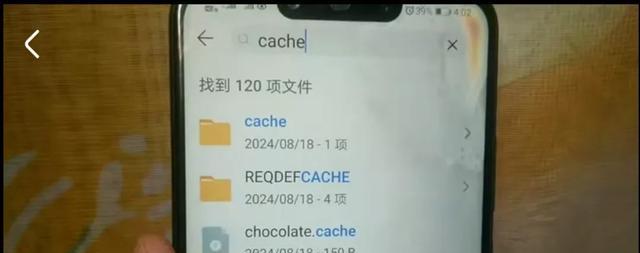
Many apps, especially some domestic apps, will place advertising images, temporary videos and other materials in a folder called "catch" (note the spelling). These files continue to accumulate and take up considerable space. After deleting them, the app will be downloaded again when it is opened again. The first load may be slightly slower, but it will not affect functionality.
While you're at it, type "catch" into the file manager's search box to find these folders. However, it should be noted that if there is a hidden file with a "." prefix, do not delete it, because that is the configuration tag of the application. Once deleted by mistake, the temporary file may appear in your photo album by mistake.
Powerful cleanup without root
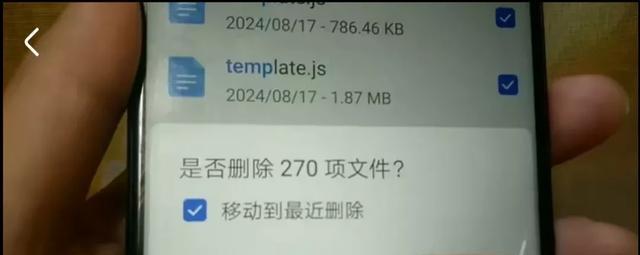
Turn on USB debugging in the mobile developer options and connect the computer with a data cable. For advanced users, you can use ADB commands for deeper cleanup and send cache clearing instructions through the command line tool. This method can force all applications to release the cache.
The system will compress the total cache size to a lower level, such as less than 4GB, to achieve an instant slimming effect. This method will not delete the chat history of WeChat and QQ, but it may clear the local thumbnails of avatars and pictures. They need to be reloaded when viewing again, and will not affect the core data.
Cloud storage strategy
What has become a fundamental solution is to transfer local files to the cloud. Whether it is Apple's iCloud, Google Photos, or my country's Xiaomi Cloud and Huawei Cloud, they all support the function of "uploading original images and saving space locally." Once this function is turned on, full-resolution photos and videos will be uploaded to the cloud, while only the optimized versions will be retained locally.
For example, if you have a 200GB photo album, after turning on this function, it may only occupy about 20GB locally. If you need to view the original image, you can download it from the cloud at any time. This is like expanding the storage space of your mobile phone on a large scale.
Hardware selection and data security
When buying a new mobile phone, memory chip specifications play a huge role. Priority should be given to equipment with UFS 4.0 specifications. Compared with the old UFS 3.1, with the same 256GB capacity, the actual usable space and access efficiency are higher, and the power consumption is lower, which equals additional performance and space.
Before disposing of an old phone, you must perform a complete data wipe, find the "Encrypt phone" option in the system settings, turn on full disk encryption, and then perform a factory reset. This way, even if the phone is taken by others, you will not be able to use data recovery tools to retrieve your old data. This is in line with current best practices for data security.
After completing the process like the above steps, then check the storage space. If the release is still not obvious, then the problem will often focus on the WeChat application. Go to the general option in the settings section of WeChat, then find the specific setting of storage space, and clean up the "cache" (not content such as chat records) alone. Generally speaking, it can release several GB of space. Combining these methods can achieve "burden reduction" for mobile phones in a systematic way to achieve the purpose of reducing the burden.
Can you tell me how much storage space is left on your phone? Have you ever missed the opportunity to capture key and important moments because your phone has insufficient storage? Please share your related experiences and clever ways to clean up storage space. If you feel that these methods are useful, don’t forget to like them and share them with your friends who are also suffering from storage problems.