Nowadays, email applications have become a standard feature in work and life. However, whether it can effectively protect privacy and be used without a network is still a concern among many users.
A new desktop option for privacy protection
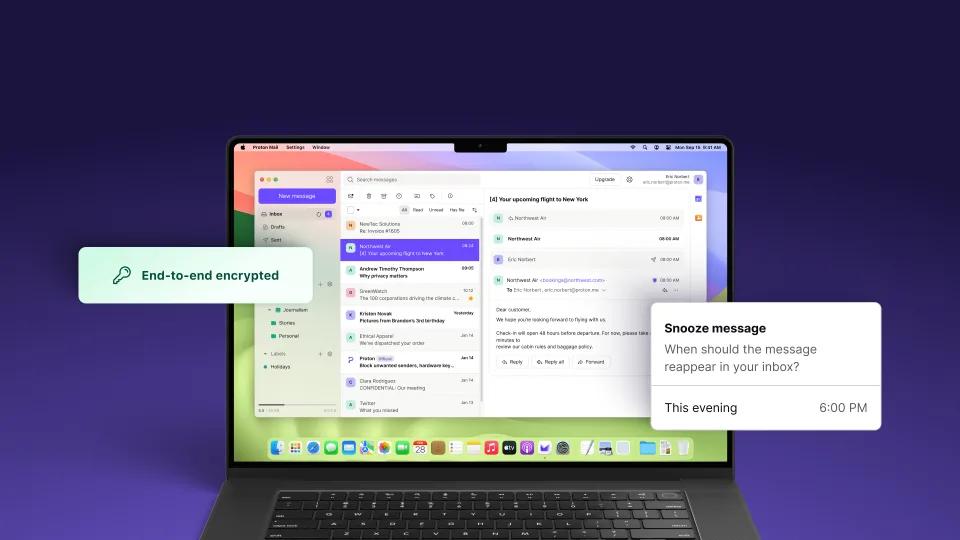
Recently, a well-known encrypted email service provider launched its official desktop application, which is currently in the public testing stage. This application is specially optimized for the two major desktop operating systems, Windows and macOS, with the purpose of creating a more stable and convenient local usage environment for users.

Unlike common web access channels, this desktop is used for local installation and operation, reducing the uncertainty that may be caused by the browser environment. It continues the service's core promise of end-to-end encryption for outgoing emails. This shows that the email content is always encrypted from the time it is sent by your computer until it is decrypted by the recipient, effectively preventing data snooping during the transmission process.
A substantial breakthrough in offline access
For users who often travel for business, or for people with unstable network environments, checking emails offline has become an urgent need. This desktop application promises to provide offline access, and the program will automatically cache a certain number of emails locally on the device. When you are on a plane, in a signal dead zone, or encounter a network failure, you can still check the contents of cached emails.
Best of all, you can even draft new emails while offline. Such a function liberates the workflow from the constraints of real-time online, allowing users to process emails at any inspired or free moment, and then send them all in one after the network is restored, which greatly improves the flexibility of time utilization.
Say goodbye to complex bridge configurations
Prior to this, if technology enthusiasts planned to use the encrypted email service offline through a third email client (including Outlook, Thunderbird), they had to use an intermediate tool called a "mail bridge" to complete complex account configurations. This level is related to the IMAP/SMTP server settings, which is technically difficult for ordinary users.
The new official desktop app eliminates that step completely. Users only need to download and install it just like installing ordinary software, and then log in with their account, and then they can use it directly, including future offline functions. This undoubtedly reduces the overall difficulty of using private email services, allowing a wider group of non-technical users to easily benefit from it.
Functional boundaries between online and offline
What needs to be clearly understood is that the offline function has its clear boundaries. In the absence of a network connection, you can view past emails cached locally, and you can also compose new emails and save them to the outbox. However, the actual sending of emails, receiving new emails, and performing end-to-end encryption operations still require a connection to the Internet.
The company clarified that the negotiation process for end-to-end encryption requires secure communication with the server, and this communication is inseparable from the network. Therefore, the offline mode is more like a secure "reading room" and "draft box", but the core sending and receiving links and encryption links still need to be completed online, which is determined by the basic principles of the encryption technology itself.
Encryption rules for automatic forwarding
For this service, automatic email forwarding is available to paying users. Regardless of whether it is set up on the desktop or the web, once you automatically forward the email to other users using the same service, the email will remain end-to-end encrypted, and the forwarding process will not destroy its security.
However, if the email is automatically delivered to other outgoing mailbox locations, such as Gmail and QQ mailboxes, the encryption protection cannot be sustained. The email will be delivered in the decrypted plaintext form. This distinction is used to remind users that when setting automatic delivery rules, they must clearly understand its security limitations and flexibly adjust the strategy according to the recipient.
Phased rollout of access strategy
This desktop application is not available to all users upon release. Initially, access will be given to those who pay to participate in the Visionaries program. The company briefly reopened subscriptions to this premium package as an early access window.
According to the official roadmap, the plan will be open to all users in early 2024, including free users, and the download and use of this desktop application will be fully liberalized. Such a phased launch strategy will help the development team control the scale of users in the early stages, collect feedback and fix bugs more efficiently, thereby ensuring that a more mature and stable product is ultimately presented to the public.
At a time when privacy leaks occur frequently and mobile network coverage is still not perfect, how big a change would a desktop tool that allows you to process emails safely offline have on the workflow you are currently using? Are you willing to try a new email client in order to have stronger privacy control and enjoy the convenience of being offline? Welcome to share your views in the comment area.