Recently, Microsoft secretly sent an undisclosed “black technology” to Windows 11 preview users, which is automatic super resolution. This extremely secretive function can directly improve the picture quality and smoothness of the game with the help of AI. It sounds quite beautiful, but there are many thresholds and restrictions behind it.
What is automatic super resolution
Generally speaking, this is a technical measure that comes with the Windows system for image enhancement and upgrade. It does not rely on solutions introduced by similar graphics card manufacturers such as Nvidia's DLSS or AMD's FSR. Instead, Microsoft directly uses AI algorithms to directly process the game screen. Its core goal is to allow the originally running display game to maintain smooth and smooth operation while displaying clearer image details.
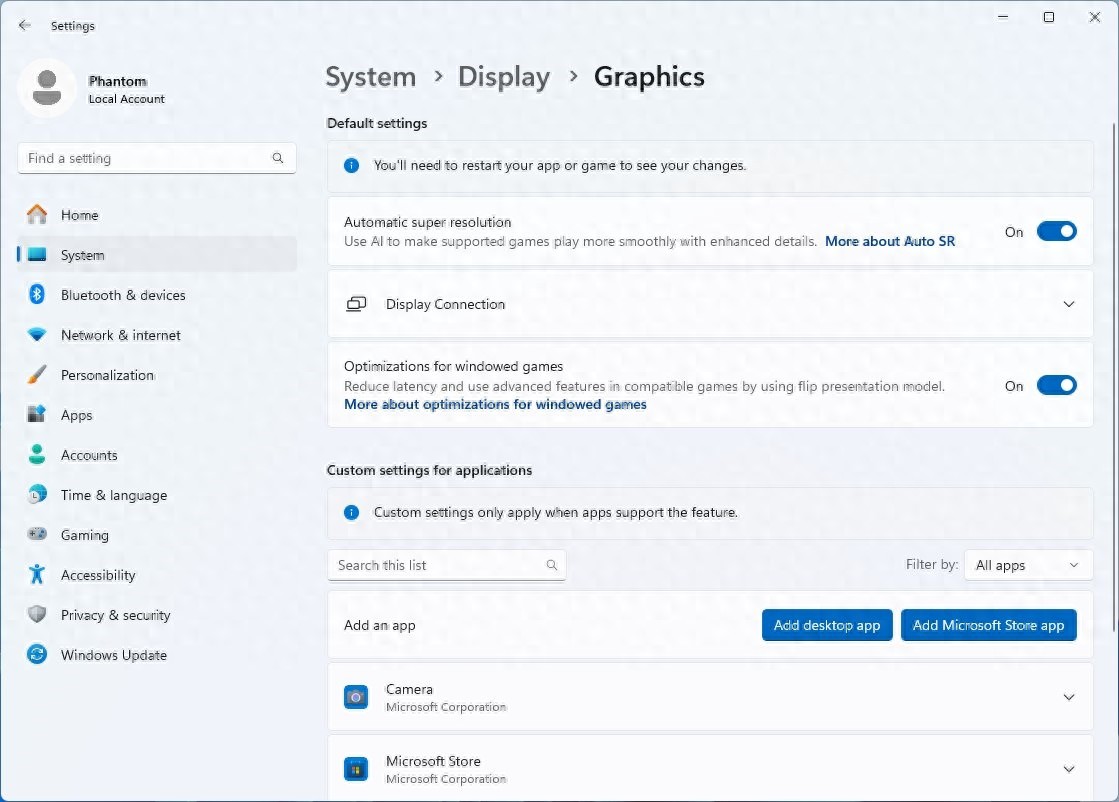
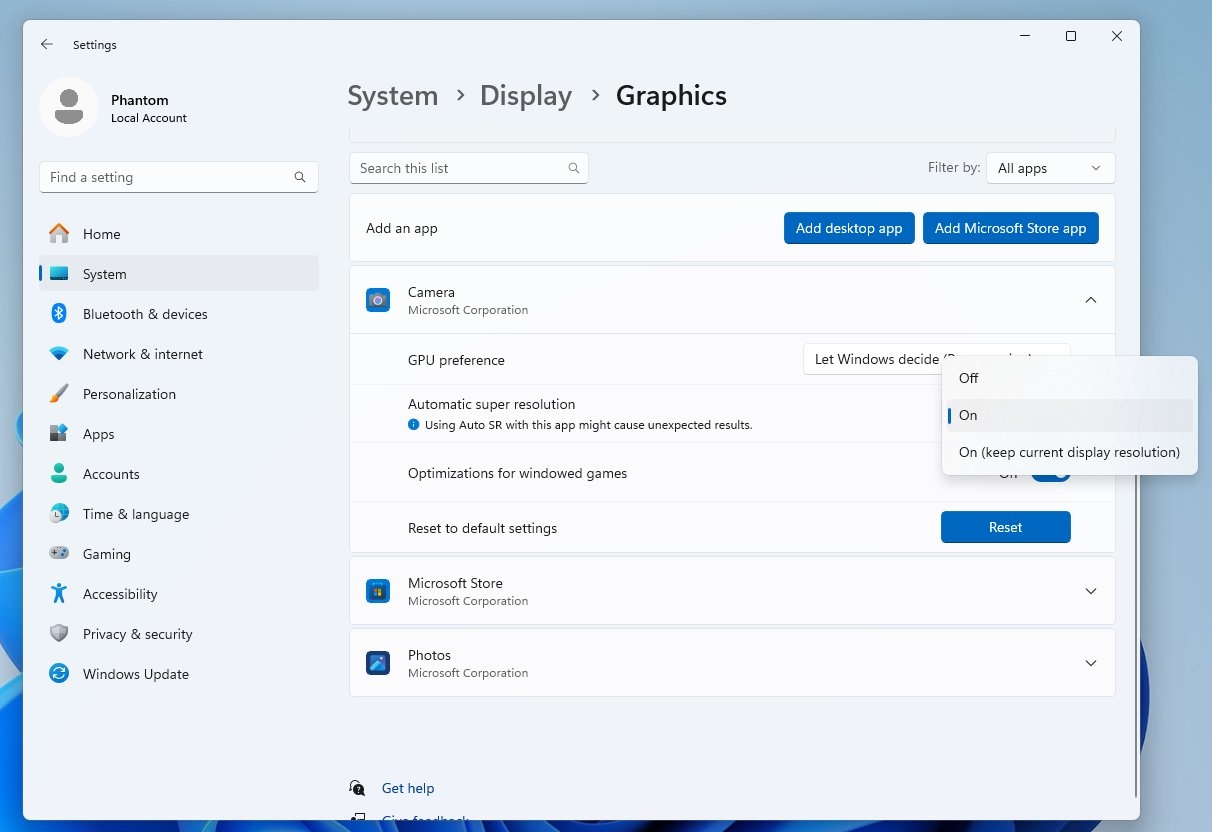
The function entrance noticed by the user is in the "Graphics Settings" under the "Display" column in the system settings. Its official description is as follows: using AI to enhance assistance, it supports the game to obtain finer details and makes the game run more smoothly. This situation means that Microsoft is trying to integrate AI-driven image quality enhancement measures directly into the operating system, thereby evolving it into a service with basic characteristics.
How to manually enable hidden features

Currently, this feature is turned off by default in the preview version, and gamers cannot use it directly. However, it is possible to force it on with the help of certain technical means. The specific method is to run the command line tool as an administrator, enter the customized command, and then restart the computer. This command will modify the system's configuration flags, thereby unlocking this hidden graphics option.
However, even if it is turned on manually, this feature is currently in its early stages. According to actual testing conditions, it still cannot have any visible effects on existing games. This means that its underlying driver and compatibility list are not yet ready, and it looks more like a semi-finished product and has to wait for subsequent official updates.
Hardware threshold behind functions
This feature of Microsoft is not for all users. It provides clear requirements for computer hardware, especially graphics cards. The graphics card must have a built-in dedicated NPU or AI computing core. Currently, only some high-end independent graphics cards and integrated graphics cards released in recent years may meet the requirements.
This shows that many gamers using older graphics cards or mainstream configurations may not be able to enjoy this service. Microsoft has not released a specific list of supported graphics card models, which has caused uncertainty for users. Because the hardware threshold is high, this feature may only be a "toy" for a few high-end users at the beginning.
Differences from existing technology
The currently mainstream image enhancement technologies, such as DLSS and FSR, are developed and driven by graphics card manufacturers (NVIDIA, AMD). They are deeply dependent on the hardware architecture of their own graphics cards. Microsoft's automatic super-resolution attempts to take a different path: the operating system provides a universal AI enhancement layer.
The potential advantage of this approach is that it can theoretically support different brands of graphics cards, thereby reducing the burden that game developers need to bear in adapting to different technologies. However, it also faces a huge problem: how to achieve or exceed the optimization effect of a dedicated solution without understanding the specific details of the underlying hardware. This is still an unknown and uncertain situation.
Other useful updates for the preview
In addition to this hidden feature, this preview version of Windows 11 Build 26052 also brings some more immediate improvements. For example, the system finally natively supports Sudo commands. This is good news for developers. They can run commands directly in the Windows terminal with administrator privileges without switching the user interface.
There has been another improvement in Bluetooth audio. The system's support for low-power audio devices has been strengthened, especially the connection experience for auxiliary devices such as hearing aids has been optimized. A new microphone test function has been added to the settings, which makes it easier for users to check whether the audio input device is in normal working condition.
Outlook and concerns about the future
Microsoft’s ambition to deeply integrate AI into the operating system is demonstrated through automatic super resolution. If successful, players may be able to easily get image quality improvements on any supported game in the future. However, it also raises this question: When Microsoft, NVIDIA, and AMD each promote similar technologies, will it cause confusion in standards, thereby increasing the difficulty for developers to adapt?
Whether this feature will eventually be open to all users for free, or whether it will become a paid service or a feature unique to high-end versions, there is also no definite conclusion at the moment. Its actual effect and resource usage will also need to be clarified by large-scale testing after the official version is released.
Do you think that the AI image quality enhancement function provided by the operating system itself will replace the DLSS, FSR and other technologies of graphics card manufacturers in the future, or will it just become a supplementary option that has no effect and is dispensable? Welcome to share your personal opinions in the comment area. If you feel that this article can be helpful, please give it a like and support.