To process text in the digital world, each character requires a unique "ID number", that is, an encoding. Which encoding you choose depends entirely on which character set standard you adopt. This may seem like a basic concept, but it directly affects whether the software can correctly display and process text in different language environments around the world.
The history and limitations of the ASCII character set
ASCII encoding was born in the United States and was developed by the American National Standards Institute. The purpose of this is to unify information exchange in the English environment. It uses only 7 bits to number characters. These numbers define a total of 128 characters covering English letters, numbers and common punctuation marks. For example, the number of the capital letter A is 65, and the number of the number 0 is 48.
Considering that a byte contains 8 bits, the ASCII code actually only occupies the lower 7 bits, and the highest bit is usually set to zero. This design is simple and efficient, and can be well adapted to early English computer systems. However, its 128-character capacity cannot meet the requirements of non-English languages at all, which laid hidden dangers for the coding chaos in the following decades.
The rise of multi-byte character set MBCS
In order to solve the encoding problems of other languages, various countries have developed multi-byte character set solutions based on ASCII. The core idea is to retain the original ASCII characters from 0 to 127, and use the encoding after 128 for expansion. For languages with a large amount of characters such as Chinese and Japanese, one byte is not enough, so two consecutive bytes are used to represent a character.
This forms MBCS, which is a multi-byte character set. In this scenario, a text may contain a mix of single-byte characters and double-byte characters. For example, in a sentence that contains a mix of Chinese and English, English letters occupy one byte, while Chinese characters occupy two bytes. This mixed situation creates challenges for string processing programs, such as accurately calculating character lengths becomes complicated.
Operating system character set management
When the operating system faces different MBCS defined around the world, it needs a mechanism for identification and switching. This mechanism is called a "code page". In Windows systems, each locale corresponds to a specific code page number, such as the commonly used code page 936 for Simplified Chinese.

The output of the console program will use the current code page of the operating system by default. Developers can also dynamically modify the character set used by the console window by calling specific functions, such as SetConsoleCP . This design allows the same computer to display text in different languages in different scenarios. However, it also causes the problem of garbled characters when files are transferred between different encoding environments.

A unified vision for Unicode
In order to completely end the coding confusion, international organizations launched the Unicode standard. It has the goal of assigning a globally unique numerical number to every character in all written languages in the world, and such numbers are called "code points." Code points are generally expressed in hexadecimal and are prefixed with "U+".
For example, the code point of the Chinese character "田" is U+7530, and the code point of "A" in the Latin alphabet is U+0041. No matter what platform, program or language environment you are on, the code point value corresponding to this character will not change. Unicode does not directly define how characters are stored and transmitted in the computer. It only provides the mapping relationship between characters and code points, and the specific storage scheme is implemented by encoding formats such as UTF-8 and UTF-16.
Coding plane and implementation of Unicode
The original Unicode standard UCS-2 used a 16-bit encoding method, and the number of characters it could represent was about 65,000. Due to the increasing number of included characters, the standard was upgraded to UCS-4. This standard uses a 32-bit space and divides the code points into 17 coding planes. The most basic of them is the 0th plane. This plane is called the "Basic Multilingual Plane", which contains most commonly used characters.

Characters beyond the BMP range, such as some rare Chinese characters or emoticons, have code points beyond the range that can be represented by 16 bits. UTF-16 encoding uses a "surrogate pair" mechanism to represent these characters with the help of two 16-bit code elements. As of a certain version of Unicode, more than 99,000 characters have been defined, of which more than 70,000 are Chinese characters, which shows its wide coverage.
Character set selection in actual development
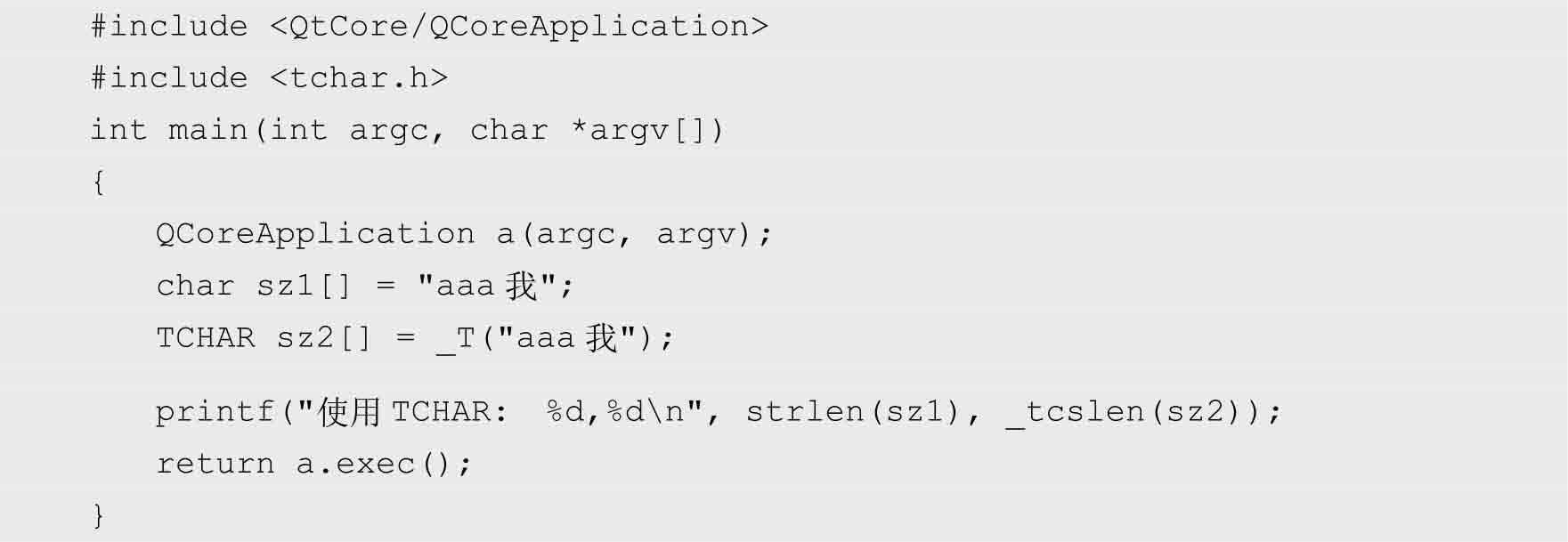
In development environments such as Visual Studio, when creating a project, you need to select a character set, such as "use Unicode character set" or "use multi-byte character set". This selection determines how the preprocessor interprets TCHAR types and _T macros, and determines which version of Windows API functions to link against.
If Unicode is selected, TCHAR will be defined as wchar_t , the string literal will be preceded by an L prefix, and the wide character API with a W suffix will be called. Assuming that a multi-byte character set is selected, TCHAR corresponds to char , and the API with the A suffix is called. By default, the Qt framework also supports Unicode, which ensures that cross-platform applications can handle multilingual text better. To avoid garbled characters and ensure software internationalization, understanding and correctly configuring the project character set is a key step.
In your development process, have you ever encountered annoying garbled characters due to improper character set settings? How did you investigate and solve it at that time? Welcome to share your experience in the comment area. If you think this article can help you with the MBTI test , please like it to support it.