In the digital age, USB flash drives and mobile hard drives are a must-have for almost everyone. However, do you really understand the actual situation of this small device in your hand? There are some carefully disguised fraudulent products on the market. Their capacity is falsely marked. The files look like they have been saved, but are actually lost silently, putting your important data at risk.
The truth about storage fraud

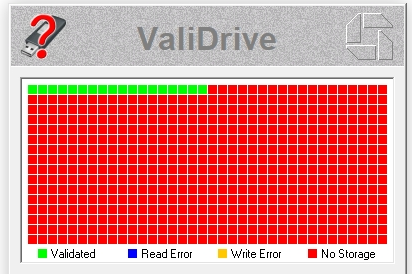
Some low-priced large-capacity USB flash drives or mobile hard drives sold on the market may only contain a small number of real memory chips, such as 64GB. If you plug this type of device into your computer, the system will mistakenly recognize its larger capacity, such as 1TB or 2TB, and will allow you to save files into it normally.
The file directory and attribute information must be written to that part of the real existence space, so when viewed on the computer, the file list is complete. However, the problem is that once the 64GB of real space is full, the data of subsequent files will not be actually saved, but the operating system will not receive any error prompts, and the data will actually be quietly discarded.
The core role of software
The primary value of a professional USB flash drive detection software is to reveal the true condition of the device. It can bypass the false information reported by the device itself and directly perform low-level scanning and read-write verification of the physical storage unit, thereby accurately measuring the real capacity that can be used normally.
By writing special test data to the USB flash drive and repeatedly reading and verifying it, the software can effectively determine whether its nominal capacity is true. This situation is extremely critical for identifying fraudulent devices such as expansion disks and black chips. It is a necessary inspection step for users when purchasing second-hand storage devices or using U disks from unknown sources.
Key performance indicator detection
In addition to the authenticity in terms of capacity, the performance of the USB flash drive also has a direct impact on the user experience. A good testing software will give a reading and writing speed test, which covers sequential reading, sequential writing, and 4K random reading and writing speeds that affect small file access. These data are more meaningful than the "theoretical maximum value" promoted by the manufacturer.
The results of the USB flash drive test can help you determine whether it meets the standard performance specified by USB 3.0, 3.1 and other interfaces, or identify performance bottlenecks caused by the aging of the main control chip and poor quality of flash memory particles. Knowing these specific indicators will help you estimate the time required when transferring large amounts of photos, videos, or running portable software.
Quality and stability assessment
The quality of USB flash drives has an impact on data life. Professional testing tools can be used to scan for bad blocks to find out the physically damaged areas in the memory chip that cannot reliably store data. The frequent occurrence of bad blocks indicates that the device has poor reliability and is not suitable for storing important data.
Some software will also provide continuous writing tests or data verification tests, using long-term, high-load read and write activities to check the stability and heat control capabilities of the U disk. U disks with poor quality may experience errors during this process, or may experience reduced speed, or even be disconnected directly, thus exposing potential problems.
Solve common problems
U disks often encounter situations that cannot be identified during use, the file system is damaged, and the write protection cannot be lifted. Excellent tool software generally integrates some repair functions, such as safely removing hardware, performing forced formatting, and clearing the write protection status. What we are talking about here is for logical protection, as well as repairing the MBR or partition table.
Even if the physical damage cannot be repaired with the help of software, the software can quickly diagnose whether the problem is a logical error, a driver conflict, or a hardware failure, thereby preventing users from performing invalid operations. It can help you determine whether a U disk with abnormal recognition still has the possibility of data rescue.
Selection and usage suggestions
When faced with the dazzling array of U disk tools in the market, you should choose regular software that has a good reputation and is updated in a relatively timely manner. Before testing, be sure to back up the valuable data in the USB flash drive because in-depth testing and repair operations will generally erase all contents.
When purchasing a new USB flash drive, before using an important USB flash drive, or when you notice abnormalities in device performance, it is recommended to carry out testing. It is important to develop the habit of regularly checking the health of storage devices, especially for storage media used to store non-renewable data such as work files and family photos. This can effectively prevent data disasters.
Have you ever lost important files because the capacity of a USB flash drive was falsely marked or damaged without warning? Share your experience or thoughts on data protection in the comment area. If this article is helpful to you, don’t forget to like it and share it with more friends.