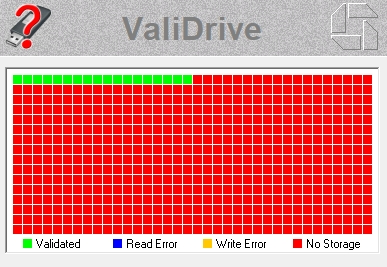
The USB flash drive you buy is either a portable hard drive, and its nominal capacity never matches the actual usable space. Such a "shrunk" storage device will not only make people spend more money, but may also lead to hidden dangers of data loss.
Why do storage devices have false capacity standards?
In low-priced storage devices, the phenomenon of false capacity marking is quite common. Some manufacturers will use smaller storage chips and use technical means to cause the computer to mistakenly recognize a larger capacity. When you store files that exceed the actual capacity, the data will be damaged and difficult to recover. In 2022, a local consumer association randomly inspected commercially available U disks and discovered that nearly 30% of the products had false capacity marking problems to varying degrees.
This phenomenon is more common on online second-hand platforms or informal channels. Merchants take advantage of consumers' greed for cheap to sell equipment with only half the actual capacity or even less. The price is far lower than the market price. For ordinary users who are not familiar with technology, they often realize that they have been deceived when the data is full and errors occur.
Core Principles of Capacity Detection Tools
Professional detection tools do not rely on the capacity reported by the operating system. They write specific data to each storage unit of the storage device, read and verify it, and then calculate the real physical capacity. This method can completely expose fraud committed by modifying firmware information.
Not just the total capacity, the tool also analyzes the device's file system and cluster size. For example, there is a U disk marked as 64GB. In the case of Windows NTFS format and exFAT format, due to the different system file occupation and cluster size, the actual usable space will vary from a few MB to hundreds of MB. Detection tools can clearly present this information to users.

Understand detailed equipment inspection reports
A professional report does not just display the capacity. It will also list the manufacturer of the device, as well as the product model and even the unique serial number. This included information can help check whether the product is consistent with the promotion. When carrying out corresponding rights protection, this information is still an extremely important category of evidence. The serial number is effective in determining whether the device is a copycat or refurbished product.
In the report, the concepts of "free space" and "available space" are different. Free space refers to the part that is not used on the physical level, and available space is the part that the operating system can identify. If the difference between the two is particularly large, it may indicate that the device has hidden partitions or bad sectors. Detection tools can reveal these potential problems.
The significance of real-time monitoring of reading and writing speed
The speed of reading and writing has a direct impact on usage efficiency. When copying that large file to a USB flash drive, if the writing speed is only 5MB/s, the waiting time will be more than ten times that of a high-speed device. The real-time monitoring function allows you to intuitively understand the performance level of the device after purchase or during daily use.
The status of the device can be reflected by speed fluctuations. For a storage device, if it is running healthily, the writing speed should be relatively stable. If the speed shows a cliff-like drop or fluctuates violently, it is very likely to indicate that the storage chip has aged, or has poor contact conditions or bad blocks. This is actually a reminder to the user that data backup needs to be performed in a timely manner and that the device needs to be replaced.
The convenience of cross-platform support
Today's users may use Windows laptops, Apple MacBooks, or computers equipped with Linux systems. There is a detection tool that runs on all of these systems, eliminating the hassle of finding different versions of the software. No matter what environment the user is in, he or she can quickly perform a physical check on the storage device.
Such compatibility ensures the consistency of testing standards. For the same mobile hard disk, the testing results on different operating systems should be the same. If the tool can only run on a certain system, the authority and versatility of the testing results will be greatly reduced. Cross-platform support eliminates this doubt.
How to use tools to avoid buying risks
After receiving the newly purchased USB flash drive or mobile hard disk, use the testing tool to verify it immediately. The entire process usually only takes a few minutes. Once you find that the actual capacity is seriously inconsistent with the nominal capacity, you must immediately take a screenshot and save the report, and contact the seller to return or exchange the product. This is the most direct and effective way to protect your own rights and interests.
For equipment that has been used for a period of time, regular testing is necessary. Flash memory particles have a write life. As the use time increases, some storage cells may fail, causing the actual available capacity to slowly decrease. Regular testing can help you understand the health status of the device and do a good job of data migration before the capacity "shrinks" and affects use.
When you recently purchased a USB flash drive or mobile hard drive, did you check its true capacity?