At the Ignite 2025 conference, Microsoft released a series of new recovery features specifically for Windows 11, which indicates that the enterprise IT operation and maintenance model may usher in a critical shift from a "fire-fighting" state to a "fire-prevention" state.
Fast machine recovery tool upgrade
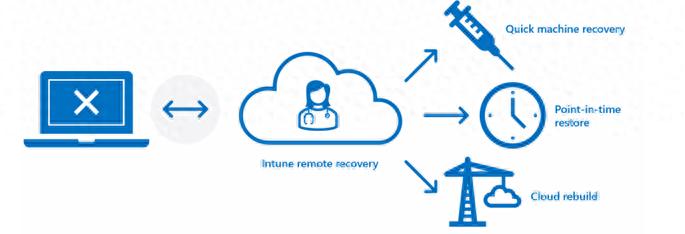
The most significant improvement of the new version of the QMR tool is that it strengthens the network capabilities of the Windows recovery environment. In the past, once the device entered WinRE, it was basically isolated from the network, which made remote repair extremely difficult. However, the new version will automatically apply the device's original Ethernet settings, allowing the device to remain online even in recovery mode.
Support for enterprise-level Wi-Fi and certificate authentication will be added in subsequent updates. What this situation means is that even if the computer cannot start normally, IT personnel can still perform remote access operations and download the necessary drivers or scripts. At the same time, the update management of QMR tools has been integrated into the Intune service, and administrators can directly approve and deploy these recovery tools on that unified platform.
Expansion of remote management capabilities
Microsoft has expanded Intune's direct management rights for recovery mode devices. Now, IT administrators can not only monitor what devices have entered WinRE through the Intune console, but can also remotely push customized PowerShell scripts to these devices or execute specific repair commands, which greatly reduces the need for on-site support.
This feature is based on an open plug-in model, which allows integration with third-party management platforms such as VMware Workspace ONE. It also works on Windows 11 virtual machines running on Azure. When the device enters the recovery environment, the system will proactively send an alert to the management platform to help the team quickly locate and prioritize high-priority faults.
Coming soon to point-in-time restore

Microsoft has previewed a feature called "Point-in-Time Restore," which allows users to roll back their PC's status to a specific time point in the past. This feature is mainly used to deal with system instability caused by failed Windows updates, incompatible drivers, or software conflicts. It is like providing a "regret medicine" to the operating system.
Users can select a restore point where the system is in normal operation and quickly restore core system files and settings, while personal files are generally not affected. This feature is planned to be rolled out to all Windows 11 users this week. The purpose is to allow ordinary users to easily solve common system failures and reduce dependence on professional support.
Cloud reconstruction preview function
Another major announcement is "cloud reconstruction". Once a computer cannot be repaired locally due to serious failures (such as hard drive damage or severe system file corruption), IT administrators can remotely trigger this function, and the cloud service will reinstall a new, pure Windows 11 system image for the failed device.
From beginning to end, technicians are not allowed to visit the site in person. After the reinstallation is complete, the system will naturally restore the user's applications, system settings and personal data by calling various services such as Microsoft Entra ID, Intune, OneDrive and Windows Backup. This service is expected to be officially provided to commercial customers in the first half of 2026.
Proactive management of update readiness
In order to shift to proactive prevention, Microsoft has launched a preview feature called "Windows Update Readiness". This feature uses Intune's unified dashboard to give IT teams a clear view, showing in real time which devices are ready to receive updates and which devices have issues that are likely to hinder the update process.
The above problems may include insufficient disk space, group policy conflicts, or necessary diagnostic data not being turned on. The team can detect these "problematic devices" in advance and take a proactive approach to implement repairs before deploying updates on a large scale. This prevents the scope of business interruption caused by update failures from expanding and suppresses the problem before it has just begun.
Overall business continuity assurance
In addition to specific recovery tools, Microsoft uses a series of solutions to create a more three-dimensional business protection system. For example, mission-critical services can provide higher runtime guarantees for key workloads of enterprises. As for the Microsoft 365 Copilot backup cloud computer solution, it provides a temporary cloud working environment when employee equipment is completely unavailable.
These functions have a common goal, which is to minimize business interruption time. Whether it is using faster repair tools to shorten the length of downtime, or relying on active management to prevent failures, Microsoft is trying to provide enterprise IT management with a complete continuity solution that covers before and after the event.
Among these new features, which one are you most interested in? To what extent do you think the "Cloud Rebuild" function can completely change the working model of enterprise IT support departments? Feel free to share your opinions in the comment area.