Numerical simulation is becoming a key tool for research and development in the fields of optics and electromagnetics, especially when physical experiments encounter high costs or technical bottlenecks. However, powerful commercial simulation software is often expensive, which causes many individuals and teams to give up.
The value and threshold of commercial simulation software
Commercial software such as FDTD Solutions or Rsoft, behind its high selling price, has long-term R&D investment and accumulation of core technologies. It is not a short-term project that can be rushed out, but it takes several years or even decades of continuous iteration to solve complex algorithmic problems and engineering problems step by step.
They generally provide intuitive graphical interfaces and stable technical support, which greatly reduces the difficulty of professional simulation operations. However, for college students, start-up teams, or individual researchers, paying hundreds of thousands or even millions of yuan in licensing fees at one time was a financial threshold that was difficult to overcome in the past.

The rise and appeal of open source software
In view of the high cost of commercial software, open source simulation software provides another alternative type. Users can not only enjoy its rights for free, but also obtain the source code, modify it and expand its functions according to their own needs. Such a do-it-yourself process itself creates a satisfying feeling of problem-solving and in-depth control of tools.
Using the open source model to encourage community collaboration, developers around the world can fix bugs and add new features together. Such an open ecosystem has accelerated software evolution and formed a knowledge sharing circle around specific tools. For example, there are many active open source projects in the field of electromagnetic simulation.
Features and background of Meep software
An open source electromagnetic simulation software called Meep uses the finite difference time domain method and is developed by a research team from the Massachusetts Institute of Technology. The software is completely free and the code is open. Since its release, it has been widely used in academia and industry, and has been used to simulate many electromagnetic structures such as photonic crystals and waveguides.
The software uses scripts to carry out modeling and calculation work, and it provides running support for Linux systems and macOS systems. For Windows users, the purpose can be achieved by installing Windows Subsystem for Linux. It is its flexibility and programmability that enable it to cope with many special simulation scenarios that are difficult to customize with commercial software in the industry.
Practical challenges
Even though open source software is free, you may encounter various technical challenges during the process of getting started. For example, many steps such as configuring the Linux subsystem in a Windows environment, installing complex dependent libraries and then compiling the source code require certain computer operation and troubleshooting abilities.
In specific applications, users may encounter errors in script operation, abnormal post-processing functions, or failure to display visualization results, etc. As happened to the author, even if all necessary packages are installed, some functions still do not work properly; the generated video files may not be previewed directly in the editor due to plug-in compatibility issues.
General process of simulation work
Whether you use Meep or other numerical simulation tools, the core workflow is the same. First, the size of the simulation area must be clarified, then the geometric structure of the device or material must be described, and precise material parameters must be determined for different areas.
Next, be sure to set appropriate boundary conditions, such as absorption boundaries or periodic boundaries, and configure calculation parameters such as excitation sources and simulation time. After the calculation is completed, operations such as processing, analysis, and visualization must be carried out on the output raw data to obtain the required physical quantities or field distribution maps.
Technical passion and continuous learning
Many engineers and students have experienced the stage of enthusiasm for "fiddling" with software. During this stage, they enjoyed the process of exploring various problems and then solving them. However, as the work becomes busy or you get used to fixed tools, this desire to explore may slowly diminish, resulting in a slow update of the knowledge system. This is a potential career risk in those fields where actual technology is developing rapidly.
Taking the initiative to start the process of learning new tools again, such as exploring Meep in depth again, is not only necessary to achieve specific tasks, but also an exercise to maintain technical sensitivity and problem-solving abilities. This process may have many twists and turns, but the experience gained from each successful debugging can be transformed into confidence when facing new challenges in the future.
# 以下都是在调用相关的包
import meep as mp
import numpy as np
import matplotlib.pyplot as plt
# import h5py
from IPython.display import Video
# 建立模型区域,括号内分为为x,y,z三个维度的跨度
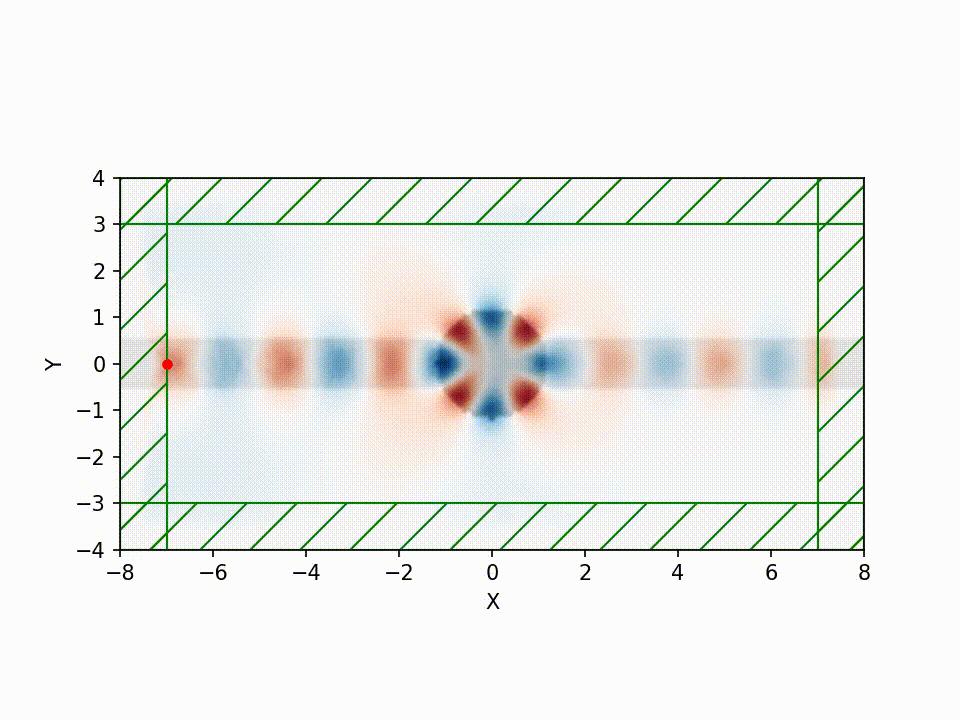
cell = mp.Vector3(16,8,0)
# 绘制几何图形,绘制矩形和圆,里边包含中心坐标,各个维度的长度或者半径的信息,以及材料的介电常数,也可以使用index设置射射率。mp.Vector3(mp.inf,1,mp.inf)中表示一个一维波导,mp.inf是meep中的无限
# 对于多个结构,可以设置 a = mp.Block(),b =mp.Block()……;geometry = [a,b,……]
geometry = [mp.Block(mp.Vector3(mp.inf,1,mp.inf),
                     center = mp.Vector3(),
                     material = mp.Medium(epsilon = 12)),
            mp.Cylinder(radius = 1.2,
                        center = mp.Vector3(0,0),
                        material = mp.Medium(epsilon = 30))]
# 设定光源,光源的类型,频率(这个可以参考meep中的unit,meep中的很多单位是归一化),电场的分量,光源位置等信息。
sources = [mp.Source(mp.ContinuousSource(frequency = 0.15),
                      component = mp.Ez,
                      center = mp.Vector3(-7,0))]
# 设定完美匹配层的边界条件,这个可以设置厚度,方向,边界的那一侧,可以通过slide,direction等参数设置,默认的是从边界向内,各个方向都存在PML。
pml_layers = [mp.PML(1.0)]
#  设置计算的精度,是10pixel/um。这个就是物理上的距离,而不是包含折射率的光程距离。
resolution = 10
# 以下开始编写仿真的主要模型构建,包括仿真的区域,边界条件,光源,精度等都要“封装”进来
sim = mp.Simulation(cell_size = cell,
                    boundary_layers = pml_layers,
                    geometry = geometry,
                    sources = sources,
                    resolution = resolution)

# 执行仿真程序,开始的时候输出仿真模型的介电常数分布,这也是为了和后边的场信息叠加构建更真实、美观的图形;之后通过mp.to_appended和mp.at_every实现每5个单位时间输出相应的结果并命名“ez”的h5文件,最终的运行时间达到200的单位时间
sim.run(mp.at_beginning(mp.output_epsilon),
       mp.to_appended("ez", mp.at_every(5,mp.output_efield_z)),
       until = 200)
# eps_data = sim.get_array(center = mp.Vector3(), size = cell, component = mp.Dielectric)
# plt.figure()
# plt.imshow(eps_data.transpose(), interpolation = 'spline36', cmap = 'binary')
# plt.axis('off')
# plt.show
# ez_data = sim.get_array(center = mp.Vector3(), size = cell, component = mp.Ez)
# plt.figure
# plt.imshow(eps_data.transpose(), interpolation = 'spline36', cmap = 'binary')
# plt.imshow(ez_data.transpose(), interpolation = 'spline36', cmap ='jet',alpha = 0.9)
# plt.axis('off')
# plt.show()
# unix% h5topng -RZc /share/h5utils/colormaps/dkbluered -c meepnote-eps-000000.00.h5 meepnote-ez-*.h5
# unix% convert meepnote-ez.png meepnote-ez-waveguide.gif
# How To Install h5utils on Ubuntu  https://installati.one/install-h5utils-ubuntu-20-04/
# h5topng https://installati.one/install-h5utils-ubuntu-20-04/
# ubuntu中安装软件信息位置等查询 https://blog.csdn.net/universe_R/article/details/122113798
# 以下是用来导出视频
sim.run(until = 0)
f = plt.figure(dpi = 150)
Animate = mp.Animate2D(fields = mp.Ez, f = f, realtime = False, normalize = True)
sim.run(mp.at_every(1, Animate), until = 200)
plt.close()
filename = "/home/xxxx/xxxxx/waveguide.mp4"
# 不能往不存在的文件夹下写文件 https://blog.csdn.net/weixin_46402437/article/details/130358795
Animate.to_mp4(5, filename)
Video(filename)
Do you prefer to use mature commercial software in your simulation work, or are you willing to toy with open source tools? What is the biggest obstacle you encounter when learning and using software like Meep? Welcome to share your experiences and opinions.