Microsoft recently launched a test update for its AI assistant. This update does not simply adjust the interface, but adds two functions. These two functions can directly connect to your other office accounts and document editing software, which means you may be able to truly use it as a smart work center.
Connectors open up information islands
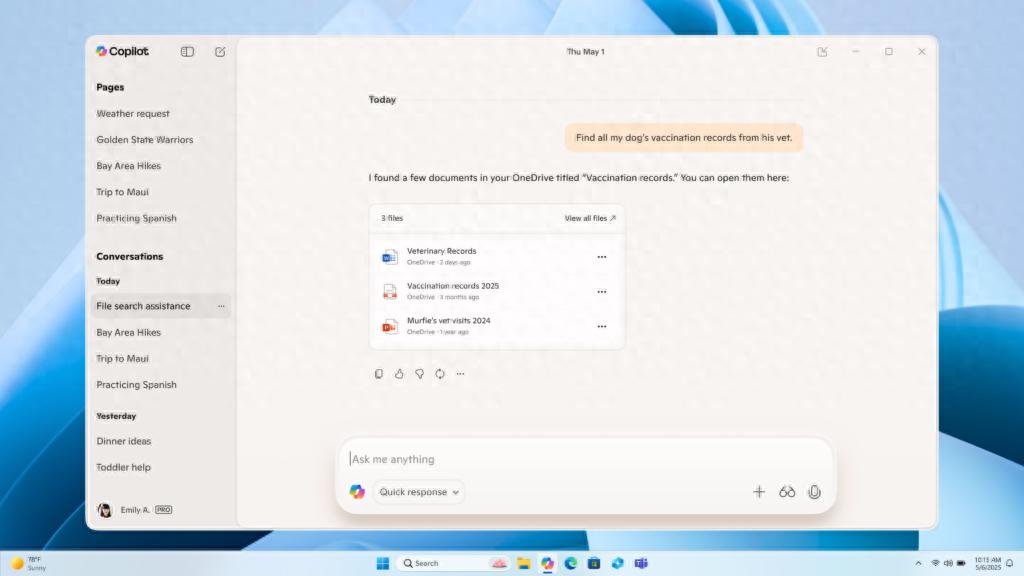
The "Connector" feature in this update gives you permission to directly connect Copilot to your personal accounts at Microsoft and third-party services. Currently, Outlook mailboxes, OneDrive cloud disks, and Google Drive, calendar and address book services are clearly supported. This actually connects AI to a massive personal data network.
After you make an authorized connection, you no longer need to manually switch between different applications to find information. For example, you can directly ask it to "find out the budget figures mentioned in last week's meeting minutes," and it can automatically scan the relevant files in your OneDrive and email and give you the answer. This feature is turned off by default, and users must proactively turn it on manually in the settings menu to ensure privacy.
Document creation improves output efficiency
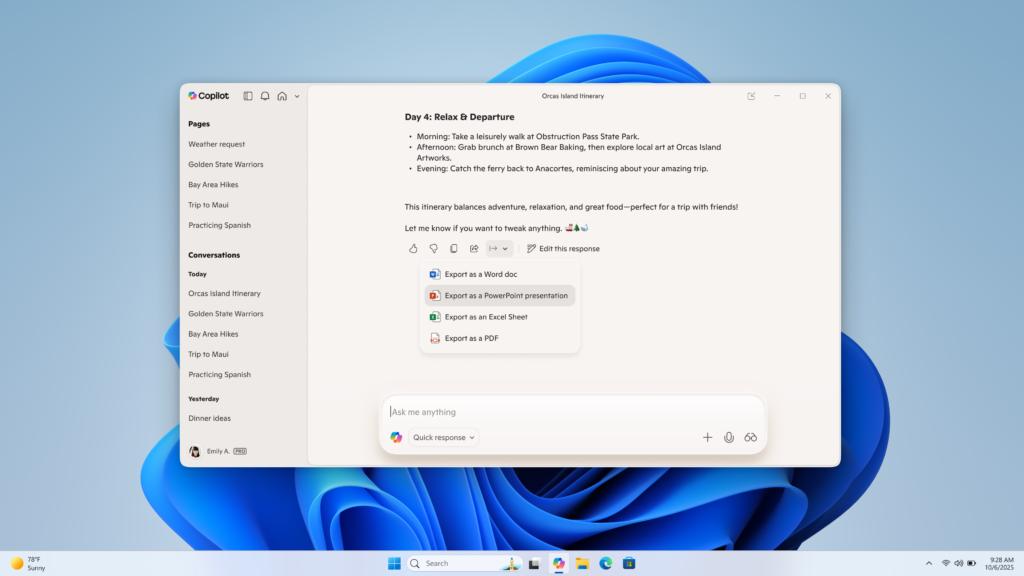
The new version of Copilot has the ability to directly generate and export documents in a variety of office formats. The scope it supports includes mainstream Word formats, mainstream Excel formats, mainstream PowerPoint formats and PDF formats. This has changed the complicated process in the past where AI could only generate text, and users had to manually copy and paste into templates.

Nowadays, users can achieve format conversion through natural language instructions. For example, you can make it "make the project plan discussed in advance into a PPT outline", or "save this data list as an Excel table." This function is extremely suitable for scenarios that require quick drafting of manuscripts or organization of data reports.
Natural language instructions become the new entrance
It makes natural language a unified entrance for cross-platform information retrieval, which is the core value of the connector function. You no longer need to remember which network drive or which email the file is stored in. Just express your needs in the form of language, and AI will perform complex search logic for you.
This type of interaction lowers the threshold for using multiple professional software. Whether it is searching for contact information, retrieving historical documents, or even summarizing data from different sources, it can be triggered by a dialogue command. This indicates that the operating mode of future software may develop in a more natural and integrated direction.
Automated thresholds to optimize user experience
Microsoft has also considered the details. When the length of the reply exported by Copilot exceeds 600 words (roughly equivalent to 1,000 Chinese words), a special "Export" button will automatically appear on the interface. This design avoids the user's trouble of finding the operation entry in long text results.
Relevant research on the length of common office documents is the basis for setting the 600-word threshold. It takes into account functional practicality and interface simplicity. With just one click, users can seamlessly transfer long-form content to applications such as Word for in-depth editing, achieving a smooth connection between AI drafting and manual refinement.
Phased push ensures service stability
Microsoft made it clear in the announcement that new features will use a phased and progressive push strategy, and all preview members will receive version updates. However, there will be a sequence in which the actual functions of "Connectors" and "Document Creation" are turned on. This is a common practice when large service providers update.
If you don't see new features immediately after updating, there's no need to check again or reinstall. Generally speaking, as long as you wait a few days, the server will activate the corresponding permissions for your account step by step. Such a "soft release" helps Microsoft monitor server load and fix early problems that may arise in a timely manner.
Functional potential meets privacy concerns
Microsoft's ambitious new feature of "Personal Intelligent Agent" was demonstrated. Copilot can use this to mobilize your information assets distributed in four places for efficient collaboration. This has significant value in improving efficiency in individual and team knowledge management. It is especially suitable for professionals who often deal with multi-source information to use this functional scenario to make it play a positive role.
However, concentrating the external access rights of multiple key accounts to the same AI agent will definitely cause users to worry about data security and privacy. Users must carefully weigh convenience and risk, make full use of the rights management tools provided by the platform, and carefully decide which accounts to connect and what data scope to share.
May I ask, in your daily work, which new function will make you particularly willing to use Copilot frequently? Is it the function called "Connector" that can connect all accounts, or the function called "Document Creation" that can directly output finished products?