
For those gamers who pursue ultimate performance, a powerful gaming notebook not only requires top-notch hardware configuration, but also requires optimized software that can deeply match it, and this directly determines the smoothness and convenience of the user experience.
Co-evolution of hardware and software
When a gaming laptop is running, high-performance hardware will generate a lot of heat, and its power consumption is much higher than that of ordinary laptops. Without effective software control, the potential of the hardware may not be fully realized, and may even cause unstable operation and excessive fan noise. Therefore, specialized optimization control software has become the "nerve center" of gaming notebooks. It is responsible for scheduling hardware resources to ensure that performance can be fully output when needed, and it can also maintain a quiet state and save energy during low loads.
The advantages of self-developed software
Unlike directly purchasing third-party general-purpose software, manufacturers have obvious advantages in choosing self-developed control software. Self-developed software can be deeply adapted to the circuit design, cooling modules and performance adjustment of their own products to achieve more precise control. For example, it can set a unique performance release curve according to the heat dissipation capacity of a specific model. This is difficult to achieve with general-purpose software. This integrated development approach of software and hardware can improve the overall stability of the product and user experience from the system level.
The role of the core control center
Let’s take the first-level control software as an example. It seems to be the command center of the entire device. Here, users can switch different performance modes such as silent, balanced, and violent with one click to adapt to different scenarios such as office, entertainment, or high-intensity games. It can also centrally manage all connected external devices, such as mice, keyboards, and headsets, and carry out unified lighting synchronization settings. Such an integrated management interface avoids the trouble of users switching back and forth between multiple different software, greatly improving operational efficiency.
Deep customization of sound scenes
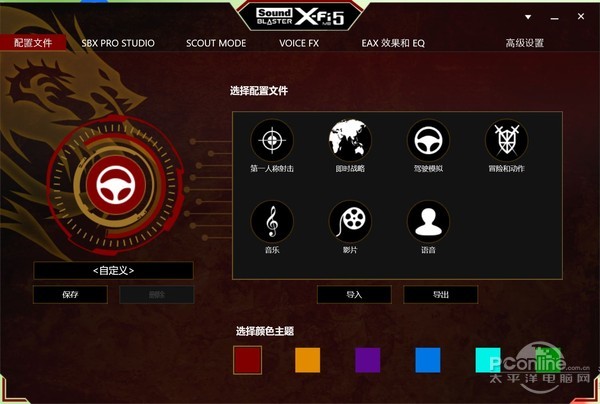
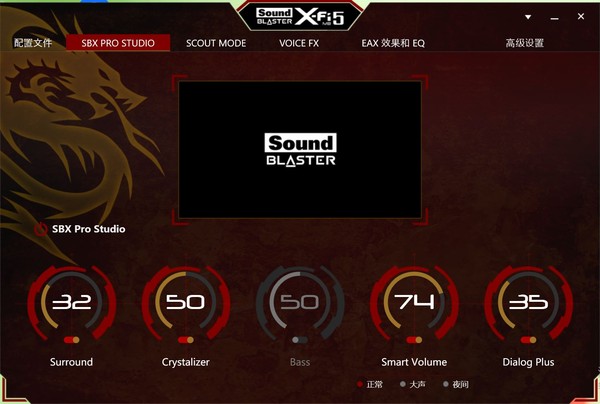
Sound positioning in the game is very critical. The sounds of footsteps and gun reloading all contain important information. Specialized sound optimization software provides a variety of preset modes. For example, the "first-person shooter" mode will strengthen high-frequency sounds and make footsteps clearer; the "driving simulation" mode will increase the low-frequency roar of the engine. These presets allow novice players to quickly get the best sound, while experienced players can use functions such as equalizer to make millimeter-level adjustments to create a completely personal sound profile.
A practical tool for positioning by listening to sounds

Functions such as "Investigation Mode" specially designed for the game are the software's direct response to players' pain points. With the help of special algorithm processing, this function can intelligently improve the loudness and recognition of key sound cues in the game's sound effects, such as the sound of character footsteps and the sound of weapons being chambered. At the same time, background noise such as explosions is moderately suppressed, which allows players to detect the enemy's position earlier and more clearly, seizing valuable opportunities in competitive games such as "PlayerUnknown's Battlegrounds" and "CS:GO", turning the sound quality of the hardware into a real competitive advantage.

Personalization of peripherals and interactions
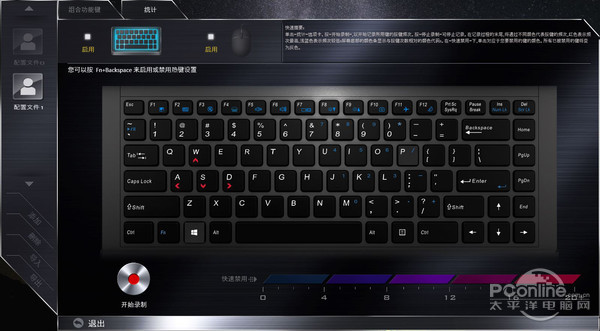
A software that optimizes keyboard and mouse buttons takes personalization to a whole new level. It allows players to map any key on the keyboard into macro commands with complex operations, or to open commonly used applications with one click. What is even more valuable is its data analysis function. The software can record events during a single game or The frequency of use of each key over a period of time is visually displayed through a heat map. Based on this data, players can adjust the most core skill shortcut keys to the keys that are easiest to operate and have the highest press frequency, thereby optimizing the operation logic, reducing the chance of accidental touch, and improving the reaction speed in battle.
After watching these detailed explanations of gaming notebook optimization software, which function do you think has the most significant impact on your daily gaming experience or improving work efficiency? You are welcome to share your views in the comment area. If you find the article helpful, please give it a like to show your support.