

Nowadays, real-time audio and video transmission has made in-depth development in many fields such as online education and video conferencing. A set of versatile and flexible technical solutions can significantly lower the development threshold.
The core module composition of iLive software
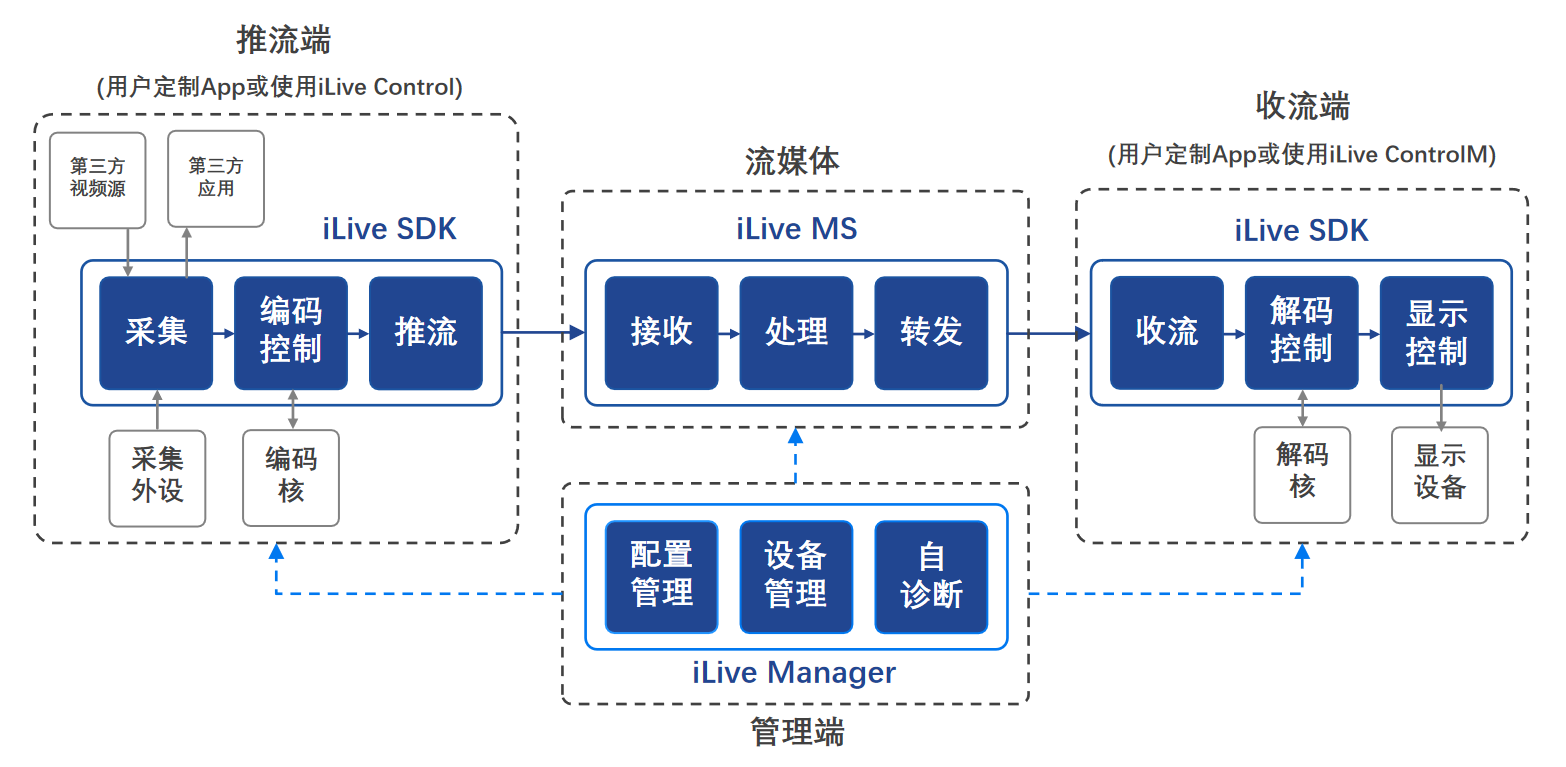
iLive software is mainly composed of three core parts. Among them, iLive SDK provides developers with key programming interfaces to achieve audio and video collection, encoding, and playback functions in applications. The other core is iLive MS, which is a streaming media server and is responsible for receiving and forwarding video data from the streaming end. The last core is iLive, which is a management console for centralized configuration and management of various software components and hardware devices in the entire audio and video transmission system.
These modules cooperate with each other to form a complete technology stack. iLive SDK ensures that the terminal functions can be realized. Whether it is pushing or receiving streams, it can be completed by integrating the SDK. iLive MS plays a key role as a hub for data transmission, ensuring stable and continuous relay of streams. The iLive management terminal allows operation and maintenance personnel to monitor and view system status and adjust changing parameters in a unified interface, simplifying and reducing daily maintenance work.
Functions and implementation methods of push streaming terminal
Starting from the streaming end of audio and video transmission, it is the key to collecting original audio and video signals. It uses hardware devices such as cameras and microphones to obtain uncompressed original data. Subsequently, this data needs to go through the process of encoding and compression, with the purpose of reducing the network bandwidth required for transmission, and finally, it will be pushed to the designated streaming media server.
To implement the push function, there are two main methods that users can achieve. One is to directly use the apps provided by iLive officials at hand. This method is suitable for quick deployment and easy use. The second is to carry out self-development based on iLive SDK and deeply integrate streaming capabilities into its own software products. It should be noted that if the developer hopes that the same application can not only push but also receive streams, then he must choose to develop based on the SDK.
The function and implementation path of the current receiving end
As the end point of the entire process, the core task of the receiving end is to receive and present audio and video content. It first obtains the compressed data stream transmitted over the network from the streaming media server. Then, the data is decoded, restored to the original format that can be played, and finally displayed to the audience on an output device such as a screen or speakers.
The flow collection function is similar to the flow push end, and there are two implementation paths. In situations where you only need to watch video streams, you can directly use iLive's player software. However, in scenarios that require customizing the playback interface or interaction logic, such as whiteboard synchronization in an education platform, secondary development must be implemented based on the iLive SDK. In the same way, if you want to combine the push and receive functions into one, you have to go through SDK development.
Deployment and role of streaming media server
The so-called streaming media server, that is, iLive MS, is the most important core transfer station in the entire architecture. It is deployed in the network and is specifically responsible for receiving real-time video streams from many streaming terminals. After receiving these video streams, the server will perform necessary processing work on them, such as format conversion or protocol adaptation, and then forward the stream to one or more streaming terminals that request viewing.
iLive MS has a very flexible deployment method. It can be installed in the company's internal data center, and it can also be deployed on public cloud platforms such as Alibaba Cloud and Tencent Cloud. It supports running on a physical server or a virtual machine, and even to simplify the test environment, it can be installed on the same computer as the streaming end or streaming end. Its special version iMS-mini can even be directly embedded into the streaming device to run.
Management end and system expansion capabilities
The iLive management terminal provides centralized management and control capabilities for the entire audio and video transmission system. With its graphical interface, administrators can easily complete parameter configuration of all components of the streaming terminal, streaming terminal and streaming media server. It also supports one-click rapid software deployment and online upgrades, which greatly improves operation and maintenance efficiency.
In addition to the core modules, iLive provides a powerful extension mechanism. Developers can write custom plug-ins according to specifications to realize functions such as beautifying video images, adding dynamic watermarks, or accessing special collection devices. These plug-ins can be directly called by the iLive system to meet the personalized needs of users without modifying the core code.
Application scenarios and authorization modes
As a widely used general basic software, iLive has a wide range of application scenarios. In the education industry, it can be used to build one-to-many online live classes. In the field of security monitoring, it can transmit real-time images from cameras to the command center large screen with low latency. In enterprises, it is a reliable technical support foundation for video conferencing systems.
This software uses the licensing model. If an enterprise intends to integrate its SDK development kit into its own products, or deploy its streaming media software on the server, it must obtain the corresponding official authorization. This model not only protects the intellectual property rights of the software, but also provides users with stable and reliable technical support and version update services.
In your work or life, have you ever encountered a situation where you need to build a real-time audio and video system? What do you think is the biggest technical challenge? Feel free to share your views in the comment area. If you find this article helpful, please give it a like and support.
