Through special methods, many friends have installed Windows 11 on old computers. However, a recent update from Microsoft has caused these computers that have been used for a certain period of time to completely stop working.
The consequences of forcibly upgrading old computers
Generally speaking, in order to make an old computer run a new system, it is often necessary to bypass official hardware detection. A common method used by users is to use commands such as "setup.exe /product server" during installation. This will make the installer mistakenly think that it is a server environment and skip the hardware check. This type of operation is extremely widespread in the technology community, especially among small businesses or individual users with limited budgets.
This operation, which allows old computers to use the new system, creates compatibility risks because Microsoft has never tested Windows 11 on these hardware. Any driver or underlying update may cause unknown problems. This update caused a startup failure, which is a concentrated outbreak of this potential risk.
October update causes startup disaster
In October 2025, Microsoft pushed a monthly cumulative update to Windows 11 users, codenamed 25H2. For most computers that meet the requirements, this is just a routine security patch. However, after installing the update, some computers using old hardware got stuck in the motherboard BIOS interface when restarting.
The screen will give a prompt of "No bootable operating system found", and the user cannot enter the Windows desktop no matter how they operate. This shows that although the computer's hard drive and the data in it are intact, the system cannot be started at all, and the device suddenly becomes an "advanced brick."
Certain old hardware becomes the hardest hit area

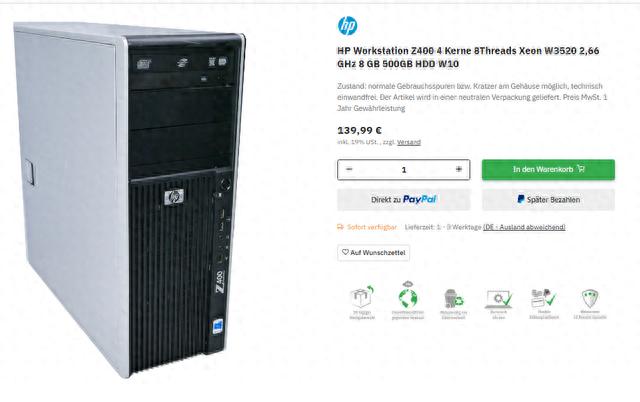
Some older models of workstations have experienced concentrated faults, such as the HP Z400. This workstation was released in 2009 and is equipped with Intel Xeon W3520 processor. Its hardware specifications are far from meeting the minimum requirements of Windows 11 for features such as TPM 2.0 and secure boot.
According to the official support page provided by HP, the highest system that the Z400 workstation can support is only Windows 8. Many users install Windows 11 on it based on cost considerations, such as using it as a monitoring display host or a simple file server, and are unwilling to purchase new equipment for these low-load tasks.
Root cause analysis of technical failures
Technical analysis shows that the problem is most likely caused by the modifications made to the system boot manager during the update. The new version of the boot loader may have compatibility conflicts with the traditional BIOS firmware in the old device and the old MBR disk partition format.
When the computer starts, the BIOS is responsible for finding and loading the boot manager on the hard disk. If it cannot recognize the updated version, it will conclude that there is no bootable operating system on the hard disk and report an error. Some technicians tried to replace the Windows 11 startup manager with the Windows 10 version and successfully restored the system to startup temporarily, which confirmed that the source of the failure was in the startup process.
User attempted fixes and struggles
Affected users have tried many repair methods when facing computers that cannot start. They first used a Windows installation USB flash drive to enter the recovery environment, then ran the "boot repair" tool, and also tried to use "bootrec /fixmbr" and other commands under the command prompt to rebuild the boot record. However, these conventional methods failed.
The only temporary solution that has been proven to be effective is to force into safe mode at startup and completely uninstall the October cumulative update using the restore points previously created by the system. However, this is only a temporary solution and cannot prevent the system from automatically installing problematic patches again in subsequent updates.
Isolated Updates and Final Compromise
Some users finally made a more radical choice, that is, reinstalling back to the Windows 10 system. Because they could not fundamentally solve the compatibility conflict between the new system and the old hardware, they took more extreme measures to ensure system stability.
They set up firewall rules in the system. This rule is used to prevent the computer from connecting to Microsoft's Windows Update update server. This operation prevents the system from downloading and installing updates on its own. Some users will even choose to completely cut off the Internet from this computer and only connect to the intranet for data transmission when necessary, relying on this method to ensure that similar problems will not occur again.
Is your old computer still in a state of "overdue service"? How do you balance functional requirements with hardware longevity?